Representable Contract State
an XML-based canonical view of EVM contract state
FX Atomic Swap lifecycle tour with Foundry and ERC-8100
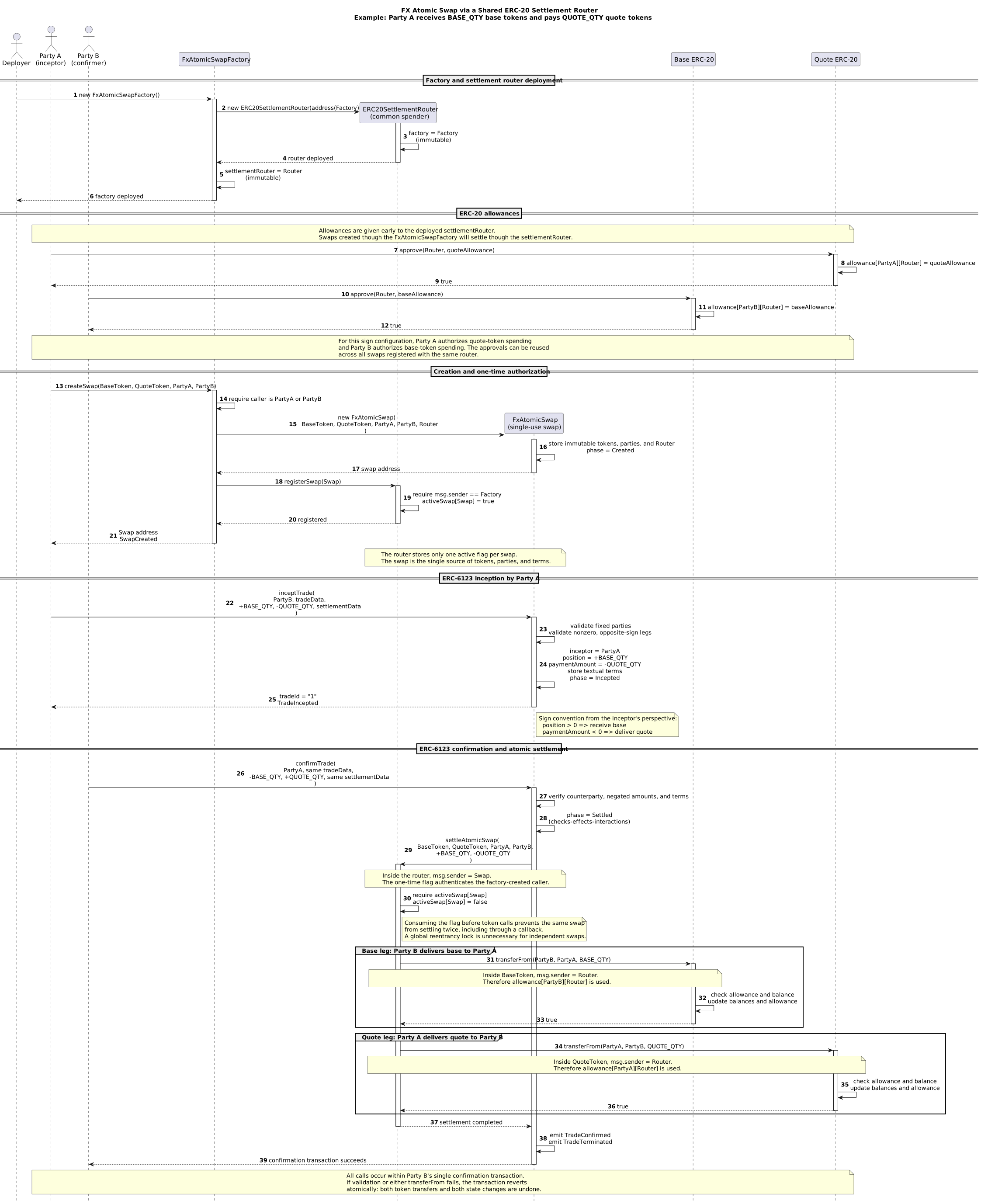
This tour downloads and runs FxAtomicSwap locally and observes the swap and both example tokens through the generic ERC-8100 EvmXmlRenderer.
The scenario is:
BASEhas 18 decimals.QUOTEhas 6 decimals.- Party A incepts a trade to receive 1 BASE and pay 1.10 QUOTE.
- Party B confirms the exact opposite view.
- Confirmation transfers both ERC-20 legs atomically through the shared
ERC20AtomicSwapSettlementRouter.
The renderer is used for three live contract views:
- the
BASEtoken, showing metadata, total supply, tracked balances, and tracked allowances; - the
QUOTEtoken, showing the same ERC-20 state; and - the
FxAtomicSwap, showing its fixed configuration, lifecycle phase, and economic terms.
For the swap view, the lifecycle phases are:
| Phase | Numeric value | Meaning in this tour |
|---|---|---|
Created |
0 | Factory-created and router-registered; no economic terms stored yet |
Incepted |
1 | Party A's signed amounts and textual terms are stored |
Settled |
2 | Party B confirmed; both token transfers completed atomically |
Canceled |
3 | Defined by the contract, but not exercised in this tour |
The two token views evolve alongside the swap:
| Point in the tour | BASE ERC-8100 view |
QUOTE ERC-8100 view |
|---|---|---|
| Deployed | Supply 0; no tracked balances or allowances |
Supply 0; no tracked balances or allowances |
| Funded | Party B holds 5 BASE |
Party A holds 10 QUOTE |
| Router approved | Party B allows the router to spend 1 BASE |
Party A allows the router to spend 1.10 QUOTE |
| Settled | Party A holds 1 BASE; Party B holds 4 BASE; allowance is 0 |
Party A holds 8.90 QUOTE; Party B holds 1.10 QUOTE; allowance is 0 |
Required Installations
You need Foundry (for the chain tooling) and JBang (to start a web service with the renderer).
For installation instructions, see the setup page.
We also assume that curl, cat, tr, and sed are present.
The following commands should be run in a shell (macOS Terminal, Windows Git Bash). You may use the copy button and just paste them into the shell.
We need three terminal sessions:
- one runs the blockchain (via
anvil), - one runs a Java service (
EvmXmlRenderer) to display the contract state in a browser, - one is used to issue commands to the blockchain.
The commands below use the standard local Anvil accounts. The private keys are public test keys and must never hold real assets or be used on a public network.
Terminal 1 — start the local chain
Use chain ID 1337 because the renderer process below is configured for 1337.
Run:
anvil --chain-id 1337
Leave Anvil running.
Terminal 2 — start the ERC-8100 renderer
The current renderer example uses release 2.5.1 and Java 21.
Run:
jbang --java 21 -Dethereum.rpcUrl=http://127.0.0.1:8545 -Dethereum.chainId=1337 net.finmath:representable-contract-state-web:2.5.1
Leave the renderer running. It serves rendered contract state on port 8080.
Terminal 3 — deploy and walk through the lifecycle
0. Download the contracts and Foundry configuration
Open a shell. If desired, create a test directory and cd to that directory. Run the following commands:
curl --create-dirs -fL 'https://gitlab.com/finmath/representable-contract-state/-/raw/main/representable-contract-state-web/src/main/solidity/examples/FxAtomicSwap/contracts/ERC20AtomicSwapSettlementRouter.sol' -o contracts/ERC20AtomicSwapSettlementRouter.sol
curl --create-dirs -fL 'https://gitlab.com/finmath/representable-contract-state/-/raw/main/representable-contract-state-web/src/main/solidity/examples/FxAtomicSwap/contracts/ERC20TokenExample.sol'               -o contracts/ERC20TokenExample.sol
curl --create-dirs -fL 'https://gitlab.com/finmath/representable-contract-state/-/raw/main/representable-contract-state-web/src/main/solidity/examples/FxAtomicSwap/contracts/FxAtomicSwap.sol'                    -o contracts/FxAtomicSwap.sol
curl --create-dirs -fL 'https://gitlab.com/finmath/representable-contract-state/-/raw/main/representable-contract-state-web/src/main/solidity/examples/FxAtomicSwap/contracts/FxAtomicSwapFactory.sol'             -o contracts/FxAtomicSwapFactory.sol
curl --create-dirs -fL 'https://gitlab.com/finmath/representable-contract-state/-/raw/main/representable-contract-state-web/src/main/solidity/examples/FxAtomicSwap/contracts/ISDCTrade.sol'                       -o contracts/ISDCTrade.sol
curl --create-dirs -fL 'https://gitlab.com/finmath/representable-contract-state/-/raw/main/representable-contract-state-web/src/main/solidity/examples/FxAtomicSwap/foundry.toml' -o foundry.toml
The directory should then contain the following files:
.
├── foundry.toml
└── contracts/
    ├── ERC20AtomicSwapSettlementRouter.sol
    ├── ERC20TokenExample.sol
    ├── FxAtomicSwap.sol
    ├── FxAtomicSwapFactory.sol
    └── ISDCTrade.sol
ERC20TokenExample.sol implements ERC-8100 in addition to its minimal ERC-20-style interface. Because Solidity mappings are not enumerable, the example records every balance account and allowance pair touched by its public operations and exposes them through balanceEntries() and allowanceEntries(). The renderer uses the ERC-8100 array-of-tuples profile to turn those views into repeated XML elements. Zero balances and consumed allowances remain visible once their keys have been tracked.
Run all commands from the root of this directory.
1. Configure the three local actors (Party A, Party B, and the contract deployer)
export RPC_URL="http://127.0.0.1:8545"

# Anvil account 0: deployer and unrestricted test-token minter
export DEPLOYER_PK="0xac0974bec39a17e36ba4a6b4d238ff944bacb478cbed5efcae784d7bf4f2ff80"

# Anvil account 1: Party A, the inceptor
export PARTY_A_PK="0x59c6995e998f97a5a0044966f0945389dc9e86dae88c7a8412f4603b6b78690d"

# Anvil account 2: Party B, the confirmer
export PARTY_B_PK="0x5de4111afa1a4b94908f83103eb1f1706367c2e68ca870fc3fb9a804cdab365a"

export DEPLOYER=$(cast wallet address --private-key "$DEPLOYER_PK")
export PARTY_A=$(cast wallet address --private-key "$PARTY_A_PK")
export PARTY_B=$(cast wallet address --private-key "$PARTY_B_PK")
export CHAIN_ID=$(cast chain-id --rpc-url "$RPC_URL")

printf '\nDeployer: %s\nParty A:  %s\nParty B:  %s\nChain ID: %s\n' \
  "$DEPLOYER" "$PARTY_A" "$PARTY_B" "$CHAIN_ID"
Expected output:
Deployer: 0xf39Fd6e51aad88F6F4ce6aB8827279cffFb92266
Party A:  0x70997970C51812dc3A010C7d01b50e0d17dc79C8
Party B:  0x3C44CdDdB6a900fa2b585dd299e03d12FA4293BC
Chain ID: 1337
2. Build the contracts
Run:
forge build
3. Deploy the two example ERC-20 tokens
The address extraction mirrors the command-line style of the ERC-8100 “Try It” example.
export BASE_TOKEN=$(
  forge create --use 0.8.24 --broadcast --root . --json \
    contracts/ERC20TokenExample.sol:ERC20TokenExample \
    --rpc-url "$RPC_URL" \
    --private-key "$DEPLOYER_PK" \
    --constructor-args "Example Base Token" "BASE" 18 \
  | tr -d '\r\n' \
  | sed -nE 's/.*"deployedTo"[[:space:]]*:[[:space:]]*"(0x[0-9a-fA-F]{40})".*/\1/p'
)

export QUOTE_TOKEN=$(
  forge create --use 0.8.24 --broadcast --root . --json \
    contracts/ERC20TokenExample.sol:ERC20TokenExample \
    --rpc-url "$RPC_URL" \
    --private-key "$DEPLOYER_PK" \
    --constructor-args "Example Quote Token" "QUOTE" 6 \
  | tr -d '\r\n' \
  | sed -nE 's/.*"deployedTo"[[:space:]]*:[[:space:]]*"(0x[0-9a-fA-F]{40})".*/\1/p'
)

printf '\nERC-20 Contracts deployed at following addresses:\nBASE token:  %s\nQUOTE token: %s\n' "$BASE_TOKEN" "$QUOTE_TOKEN"
Verify their metadata:
cast call "$BASE_TOKEN"  "name()(string)"     --rpc-url "$RPC_URL"
cast call "$BASE_TOKEN"  "symbol()(string)"   --rpc-url "$RPC_URL"
cast call "$BASE_TOKEN"  "decimals()(uint8)"  --rpc-url "$RPC_URL"
cast call "$QUOTE_TOKEN" "name()(string)"     --rpc-url "$RPC_URL"
cast call "$QUOTE_TOKEN" "symbol()(string)"   --rpc-url "$RPC_URL"
cast call "$QUOTE_TOKEN" "decimals()(uint8)"  --rpc-url "$RPC_URL"
3.1. Open the initial ERC-8100 token views
Both token contracts expose stateXmlTemplate(). Inspect both templates before opening one renderer URL per token:
cast call "$BASE_TOKEN"  "stateXmlTemplate()(string)" --rpc-url "$RPC_URL"
cast call "$QUOTE_TOKEN" "stateXmlTemplate()(string)" --rpc-url "$RPC_URL"
On macOS, open both live views with:
open "http://localhost:8080/xml?contract=$BASE_TOKEN"
open "http://localhost:8080/xml?contract=$QUOTE_TOKEN"
On Windows/Git Bash, open both live views with:
start "http://localhost:8080/xml?contract=$BASE_TOKEN"
start "http://localhost:8080/xml?contract=$QUOTE_TOKEN"
Immediately after deployment, each representation shows its name, symbol, decimals, and TotalSupply = 0. The Balances and Allowances collections are empty. Keep both browser tabs open and reload them after the token operations below.
4. Mint the initial balances
All quantities passed to contracts are integers in the token's smallest unit:
export BASE_QTY=1000000000000000000       # 1 BASE, with 18 decimals
export QUOTE_QTY=1100000                  # 1.10 QUOTE, with 6 decimals
export BASE_FUNDING=5000000000000000000   # 5 BASE
export QUOTE_FUNDING=10000000             # 10 QUOTE
Party B needs BASE; Party A needs QUOTE:
cast send "$BASE_TOKEN" \
  "mint(address,uint256)" "$PARTY_B" "$BASE_FUNDING" \
  --rpc-url "$RPC_URL" --private-key "$DEPLOYER_PK"

cast send "$QUOTE_TOKEN" \
  "mint(address,uint256)" "$PARTY_A" "$QUOTE_FUNDING" \
  --rpc-url "$RPC_URL" --private-key "$DEPLOYER_PK"
Check the initial balances:
cast call "$BASE_TOKEN"  "balanceOf(address)(uint256)" "$PARTY_A" --rpc-url "$RPC_URL"
cast call "$BASE_TOKEN"  "balanceOf(address)(uint256)" "$PARTY_B" --rpc-url "$RPC_URL"
cast call "$QUOTE_TOKEN" "balanceOf(address)(uint256)" "$PARTY_A" --rpc-url "$RPC_URL"
cast call "$QUOTE_TOKEN" "balanceOf(address)(uint256)" "$PARTY_B" --rpc-url "$RPC_URL"
Expected raw balances:
                          BASE         QUOTE
Party A                      0      10000000
Party B    5000000000000000000             0
4.1. ERC-8100 token snapshot — funded
Reload the two live token views (opened in step 3.1).
Each token representation shows a balance for Party A or Party B. No allowance entry exists yet.
5. Deploy the factory and obtain its router
The factory constructor deploys exactly one shared ERC20AtomicSwapSettlementRouter:
export FACTORY=$(
  forge create --use 0.8.24 --broadcast --root . --json \
    contracts/FxAtomicSwapFactory.sol:FxAtomicSwapFactory \
    --rpc-url "$RPC_URL" \
    --private-key "$DEPLOYER_PK" \
  | tr -d '\r\n' \
  | sed -nE 's/.*"deployedTo"[[:space:]]*:[[:space:]]*"(0x[0-9a-fA-F]{40})".*/\1/p'
)

export ROUTER=$(cast call "$FACTORY" \
  "settlementRouter()(address)" \
  --rpc-url "$RPC_URL")

cast call "$ROUTER" "factory()(address)" --rpc-url "$RPC_URL"

printf '\nFactory: %s\nRouter:  %s\n' "$FACTORY" "$ROUTER"
The final call should return the factory address.
6. Approve the shared settlement router
The parties approve the router—not the factory and not the individual swap:
# Party A will deliver 1.10 QUOTE.
cast send "$QUOTE_TOKEN" \
  "approve(address,uint256)" "$ROUTER" "$QUOTE_QTY" \
  --rpc-url "$RPC_URL" --private-key "$PARTY_A_PK"

# Party B will deliver 1 BASE.
cast send "$BASE_TOKEN" \
  "approve(address,uint256)" "$ROUTER" "$BASE_QTY" \
  --rpc-url "$RPC_URL" --private-key "$PARTY_B_PK"
Verify the allowances:
cast call "$QUOTE_TOKEN" "allowance(address,address)(uint256)" \
  "$PARTY_A" "$ROUTER" --rpc-url "$RPC_URL"

cast call "$BASE_TOKEN" "allowance(address,address)(uint256)" \
  "$PARTY_B" "$ROUTER" --rpc-url "$RPC_URL"
Expected values are 1100000 and 1000000000000000000.
6.1. ERC-8100 token snapshot — router approved
Reload the two live token views (opened in step 3.1).
The Allowances collections now contain the exact settlement permissions.
<ERC20TokenExample xmlns="urn:example:erc20-token" xmlns:evmstate="urn:evm:state:1.0" evmstate:block-number="45" evmstate:chain-id="1337" evmstate:contract-address="0xa85233C63b9Ee964Add6F2cffe00Fd84eb32338f" evmstate:renderer-id="net.finmath.smartcontracts.representablestate.xml.EvmXmlRenderer" evmstate:renderer-url="http://finmath.gitlab.io/representable-contract-state" evmstate:renderer-version="2.5.1">
	<Metadata>
		<Name>Example Base Token</Name>
		<Symbol>BASE</Symbol>
		<Decimals>18</Decimals>
	</Metadata>
	<TotalSupply unit="smallest-token-unit">5000000000000000000</TotalSupply>
	<Balances unit="smallest-token-unit">
		<Balance>
			<Account>0x3C44CdDdB6a900fa2b585dd299e03d12FA4293BC</Account>
			<Amount>5000000000000000000</Amount>
		</Balance>
	</Balances>
	<Allowances unit="smallest-token-unit">
		<Allowance>
			<Owner>0x3C44CdDdB6a900fa2b585dd299e03d12FA4293BC</Owner>
			<Spender>0xf0D7de80A1C242fA3C738b083C422d65c6c7ABF1</Spender>
			<Amount>1000000000000000000</Amount>
		</Allowance>
	</Allowances>
</ERC20TokenExample>
The account and spender addresses in the XML are resolved from the same fixed block as the amounts.
7. Create and register one FxAtomicSwap
cast send does not expose the Solidity return value directly. On this isolated local chain, first simulate the call to obtain the address the factory will create; then send the identical transaction. The predicted address remains valid provided no other createSwap transaction reaches this factory between the two commands.
export SWAP=$(cast call "$FACTORY" \
  "createSwap(address,address,address,address)(address)" \
  "$BASE_TOKEN" "$QUOTE_TOKEN" "$PARTY_A" "$PARTY_B" \
  --from "$PARTY_A" \
  --rpc-url "$RPC_URL")

cast send "$FACTORY" \
  "createSwap(address,address,address,address)" \
  "$BASE_TOKEN" "$QUOTE_TOKEN" "$PARTY_A" "$PARTY_B" \
  --rpc-url "$RPC_URL" --private-key "$PARTY_A_PK"

printf '\nSwap: %s\n' "$SWAP"
Verify that the swap is registered and that its fixed configuration matches the factory call:
cast call "$ROUTER" "activeSwap(address)(bool)" "$SWAP" --rpc-url "$RPC_URL"
cast call "$SWAP" "phase()(uint8)"                  --rpc-url "$RPC_URL"
cast call "$SWAP" "partyA()(address)"               --rpc-url "$RPC_URL"
cast call "$SWAP" "partyB()(address)"               --rpc-url "$RPC_URL"
cast call "$SWAP" "baseToken()(address)"            --rpc-url "$RPC_URL"
cast call "$SWAP" "quoteToken()(address)"           --rpc-url "$RPC_URL"
cast call "$SWAP" "settlementRouter()(address)"     --rpc-url "$RPC_URL"
Expected lifecycle values:
activeSwap = true
phase      = 0  (Created)
8. ERC-8100 snapshot 1 — Created
On macOS, open the live view of the swap with:
open "http://localhost:8080/xml?contract=$SWAP"
On Windows/Git Bash, open the live view of the swap with:
start "http://localhost:8080/xml?contract=$SWAP"
At this point, the rendered representation should show conceptually:
<Lifecycle>
  <TradeId>1</TradeId>
  <Phase>0</Phase>
  <Inceptor>0x0000000000000000000000000000000000000000</Inceptor>
</Lifecycle>
<Terms view="inceptor">
  <Position ...>0</Position>
  <PaymentAmount ...>0</PaymentAmount>
  <TradeData></TradeData>
  <InitialSettlementData></InitialSettlementData>
</Terms>
The root also records the rendered chain ID, swap address, and block number. Exact whitespace and whether binding attributes remain visible are renderer serialization details.
9. Incept the trade as Party A
The economic terms are signed from Party A's perspective:
export TRADE_DATA="FX spot: Party A receives 1 BASE and pays 1.10 QUOTE"
export SETTLEMENT_DATA="Atomic payment-versus-payment at confirmation"

cast send "$SWAP" \
  "inceptTrade(address,string,int256,int256,string)" \
  "$PARTY_B" \
  "$TRADE_DATA" \
  "$BASE_QTY" \
  "-$QUOTE_QTY" \
  "$SETTLEMENT_DATA" \
  --rpc-url "$RPC_URL" --private-key "$PARTY_A_PK"
Here:
position      = +1000000000000000000  -> Party A receives 1 BASE
paymentAmount = -1100000              -> Party A delivers 1.10 QUOTE
Check the contract directly:
cast call "$SWAP" "phase()(uint8)"                        --rpc-url "$RPC_URL"
cast call "$SWAP" "inceptor()(address)"                  --rpc-url "$RPC_URL"
cast call "$SWAP" "position()(int256)"                   --rpc-url "$RPC_URL"
cast call "$SWAP" "paymentAmount()(int256)"              --rpc-url "$RPC_URL"
cast call "$SWAP" "tradeData()(string)"                  --rpc-url "$RPC_URL"
cast call "$SWAP" "initialSettlementData()(string)"      --rpc-url "$RPC_URL"
10. ERC-8100 snapshot 2 — Incepted
Reload the browser page showing the swap state (opened in step 8), or open the view again:
On macOS, open the live view of the swap with:
open "http://localhost:8080/xml?contract=$SWAP"
On Windows/Git Bash, open the live view of the swap with:
start "http://localhost:8080/xml?contract=$SWAP"
The same XML template now resolves to:
Phase                 1
Inceptor              Party A
Position              1000000000000000000
PaymentAmount         -1100000
TradeData             FX spot: Party A receives 1 BASE and pays 1.10 QUOTE
InitialSettlementData Atomic payment-versus-payment at confirmation
The contract address remains the same, while the root block number advances.
11. Confirm as Party B and settle both legs
Party B must supply the exact opposite signed amounts and identical text fields:
cast send "$SWAP" \
  "confirmTrade(address,string,int256,int256,string)" \
  "$PARTY_A" \
  "$TRADE_DATA" \
  "-$BASE_QTY" \
  "$QUOTE_QTY" \
  "$SETTLEMENT_DATA" \
  --rpc-url "$RPC_URL" --private-key "$PARTY_B_PK"
Within this single confirmation transaction:
FxAtomicSwapverifies the counterparty, negated amounts, and matching text terms.- It changes
phasetoSettledbefore the external call. - The router consumes
activeSwap[SWAP]. - The router transfers 1 BASE from Party B to Party A.
- The router transfers 1.10 QUOTE from Party A to Party B.
- Any failure reverts the complete transaction, including both token legs and both state changes.
12. ERC-8100 snapshot 3 — Settled
Reload the browser page showing the swap state (opened in step 8), or open the view again:
On macOS, open the live view of the swap with:
open "http://localhost:8080/xml?contract=$SWAP"
On Windows/Git Bash, open the live view of the swap with:
start "http://localhost:8080/xml?contract=$SWAP"
The renderer should now show Phase = 2. The inceptor and inception terms remain represented, providing the semantic history of the completed single-use swap.
12.1. ERC-8100 token snapshots — atomic settlement reflected
The same confirmation transaction also changes both token representations.
Reload the token tabs, or save final snapshots.
The final token views should show:
BASE balances
  Party B  4000000000000000000
  Party A  1000000000000000000
BASE allowance
  Party B -> Router  0

QUOTE balances
  Party A  8900000
  Party B  1100000
QUOTE allowance
  Party A -> Router  0
The zero allowance rows remain present because the owner/spender pairs were previously tracked. This makes the transition from an approved to a consumed allowance visible in the rendered state.
13. Verify the final atomic settlement
cast call "$SWAP"   "phase()(uint8)"                         --rpc-url "$RPC_URL"
cast call "$ROUTER" "activeSwap(address)(bool)" "$SWAP"     --rpc-url "$RPC_URL"

cast call "$BASE_TOKEN"  "balanceOf(address)(uint256)" "$PARTY_A" --rpc-url "$RPC_URL"
cast call "$BASE_TOKEN"  "balanceOf(address)(uint256)" "$PARTY_B" --rpc-url "$RPC_URL"
cast call "$QUOTE_TOKEN" "balanceOf(address)(uint256)" "$PARTY_A" --rpc-url "$RPC_URL"
cast call "$QUOTE_TOKEN" "balanceOf(address)(uint256)" "$PARTY_B" --rpc-url "$RPC_URL"

cast call "$BASE_TOKEN" "allowance(address,address)(uint256)" \
  "$PARTY_B" "$ROUTER" --rpc-url "$RPC_URL"
cast call "$QUOTE_TOKEN" "allowance(address,address)(uint256)" \
  "$PARTY_A" "$ROUTER" --rpc-url "$RPC_URL"
Expected final values:
phase                  2  (Settled)
activeSwap             false

Party A BASE           1000000000000000000  = 1 BASE
Party A QUOTE          8900000              = 8.90 QUOTE
Party B BASE           4000000000000000000  = 4 BASE
Party B QUOTE          1100000              = 1.10 QUOTE

Party B BASE allowance 0
Party A QUOTE allowance 0
Because exact settlement allowances were granted, both are fully consumed. The direct cast call results should match the two final ERC-8100 token representations.
Standards and renderer references
- ERC-8100 draft:
https://eips.ethereum.org/EIPS/eip-8100 - Current renderer “Try It” example:
https://representable-contract-state-b50ce5.gitlab.io/try-it/index.html - ERC-6123:
https://eips.ethereum.org/EIPS/eip-6123
Sequence Diagram