

Representable Contract State
an XML-based canonical view of EVM contract state
ICMA Bond Data Taxonomy Demo
Introduction
ERC-8100 places the smart contract at the center of documenting a financial product's state. The smart contract orchestrates the product's lifecycle, while the ERC-8100 XML rendering represents the contract state at a precise point in time identified by a block.
ERC-8100 does not replace document formats such as FpML or ICMA BDT. Instead, it provides a base layer from which the smart contract's state can be rendered in any such format.
The implementation of ERC-8100 presented here features an optional XSLT transformer that can convert the XML representation of the contract state into required output formats such as legal documentation, a term sheet, or a dataset for a downstream system.
Demo Overview
DemoICMABondTextResource deploys a smart contract that represents a bond's
state and stores three associated resources in on-chain TextResource
contracts: one ICMA Bond Data Taxonomy product-terms template that renders the
bond's state in ICMA BDT format, and two XSLT stylesheets that transform the
resulting XML into a legal document and a term sheet.
It then simulates the bond's lifecycle through three state transitions: assigning the interest rate, assigning the ISIN and WKN, and assigning a security-token address. For each checkpoint, the demo outputs six block-pinned renderer URLs: two for the XML template at different XInclude-expansion stages, one for the canonical ICMA BDT XML, one for an HTML legal document, and two for the same HTML term sheet.
The six views demonstrate:
- the XML template with XIncludes preserved;
- the expanded XML template with XIncludes resolved recursively and
evmstatebindings still unresolved; - the canonical rendered XML;
- a legal document produced by an inline XSLT selected from an XML text node;
- a term sheet produced by an XSLT loaded directly from a
web3://URL; and - the same term sheet after its
web3://URL is discovered through XPath.
These views are generated from the contract state using static templates. The contract remains the source of truth for the financial product's state and controls its transitions.
The contracts, issuer, identifiers, and documents are fictional and intended solely for this technical demonstration.
If you prefer not to run the demo, scroll down to inspect screenshots of the results.
Required Installations
You need:
- Java 21 and JBang;
- Foundry (for Anvil and the default Forge compiler backend);
curl; and- a Bash-compatible shell such as macOS/Linux Bash or Windows Git Bash.
The alternative --compiler=solc mode additionally requires a compatible
standalone solc executable on PATH; version 0.8.24 is recommended.
For installation guidance, see the setup page.
The commands below use Anvil's public development accounts. Never use those accounts or private keys on a public network or with real assets.
Open three terminals. Terminals 1 and 2 may start in any directory. Start
Terminal 3 in the parent directory where you want the icma-bond-demo
working directory to be created.
Terminal 1 — Start Anvil
Start a local chain with the chain ID used by the renderer and the generated
web3:// resource URLs:
anvil --chain-id 31337 --hardfork cancun
Leave Anvil running.
Terminal 2 — Start the Renderer via JBang
Start the renderer directly from its Maven Central artifact:
jbang --java 21 \
  -Dethereum.rpcUrl=http://127.0.0.1:8545 \
  -Dethereum.chainId=31337 \
  net.finmath:representable-contract-state-web:2.5.1
JBang downloads and caches the artifact automatically. Leave this terminal
running. The renderer listens on http://localhost:8080.
Terminal 3 — Run the ICMA Demo via JBang
Prepare the Demo Sources Once
JBang downloads the Java application, XML, and XSLT resources from Maven Central. By default, the demo compiles its Solidity contracts with Forge at runtime, so download the small version-matched source set directly, as in the Try It examples:
DEMO_VERSION=2.5.1
DEMO_TAG="representable-contract-state-parent-${DEMO_VERSION}"
DEMO_WORK_DIR="$PWD/icma-bond-demo"

PROJECT_BASE_URL="https://gitlab.com/finmath/representable-contract-state/-/raw/${DEMO_TAG}/representable-contract-state-web/src/main/solidity"

PROJECT_FILES=$'IRepresentableState.sol
resources/ITextResource.sol
resources/TextResource.sol
examples/Web3Include/BondDataTaxonomyDemoTextResource.sol'

while IFS= read -r SOURCE_FILE; do
  curl --create-dirs -fsSL \
    "$PROJECT_BASE_URL/$SOURCE_FILE" \
    -o "$DEMO_WORK_DIR/src/main/solidity/$SOURCE_FILE"
done <<< "$PROJECT_FILES"

OPENZEPPELIN_BASE_URL="https://raw.githubusercontent.com/OpenZeppelin/openzeppelin-contracts/v5.1.0/contracts"

OPENZEPPELIN_FILES=$'utils/Strings.sol
utils/Panic.sol
utils/introspection/IERC165.sol
utils/math/Math.sol
utils/math/SignedMath.sol
utils/math/SafeCast.sol'

while IFS= read -r SOURCE_FILE; do
  curl --create-dirs -fsSL \
    "$OPENZEPPELIN_BASE_URL/$SOURCE_FILE" \
    -o "$DEMO_WORK_DIR/src/main/solidity/node_modules/@openzeppelin/contracts/$SOURCE_FILE"
done <<< "$OPENZEPPELIN_FILES"

curl --create-dirs -fsSL \
  "https://raw.githubusercontent.com/Vectorized/solady/v0.1.26/src/utils/SSTORE2.sol" \
  -o "$DEMO_WORK_DIR/src/main/solidity/node_modules/solady/src/utils/SSTORE2.sol"

printf 'Demo prepared in %s\n' "$DEMO_WORK_DIR"
The OpenZeppelin and Solady files are pinned to the versions used by release
2.5.1. The directory is named node_modules because that is the Solidity
import layout expected by the released demo; Node.js and npm are not used.
Forge downloads and caches the pinned Solidity 0.8.24 compiler on the first
run, so no standalone solc installation is required for the default mode.
On later runs, you may skip the preparation block. Open Terminal 3 in the same parent directory; the run block below reconstructs the default working-directory path.
Run the Demo
Change to the directory created during preparation. The default expression also restores the path during a later run in a new Terminal 3 session:
DEMO_WORK_DIR="${DEMO_WORK_DIR:-$PWD/icma-bond-demo}"
cd "$DEMO_WORK_DIR"
Then run the demo main class through Spring Boot's PropertiesLauncher:
jbang --java 21 \
  -Dloader.main=net.finmath.smartcontracts.representablestate.demo.DemoICMABondTextResource \
  --main=org.springframework.boot.loader.launch.PropertiesLauncher \
  net.finmath:representable-contract-state-web:2.5.1
Forge is selected when no compiler option is supplied. To use the standalone
Solidity compiler instead, append --compiler=solc after the Maven artifact:
jbang --java 21 \
  -Dloader.main=net.finmath.smartcontracts.representablestate.demo.DemoICMABondTextResource \
  --main=org.springframework.boot.loader.launch.PropertiesLauncher \
  net.finmath:representable-contract-state-web:2.5.1 \
  --compiler=solc
You can also select the default explicitly with --compiler=forge.
The working directory matters because the demo compiles the downloaded Solidity sources at runtime.
The demo compiles and deploys the Solidity contracts with the selected backend, uploads and finalizes the three text resources, performs three lifecycle updates, verifies every rendered checkpoint, and finally prints the browser URLs.
Open the Printed URLs
When the demo finishes, find the console section headed:
Block-pinned contract-state renderings:
It contains four parts:
| Part | Contract state represented by the URLs |
|---|---|
| Part 0 — Initial draft | The interest rate and derived first interest payment amount are not populated, the status is NOT_ISSUED, and the identifiers and security-token address are absent. |
| Part 1 — Interest rate assigned | The contract's setInterestRate transition sets the rate to 2.5000% and derives the first interest payment amount; the status remains NOT_ISSUED. |
| Part 2 — ISIN and WKN assigned | The two security identifiers appear in the XML and both HTML documents; the rate remains 2.5000% and the status remains NOT_ISSUED. |
| Part 3 — Security-token address assigned | The identifiers and rate remain, the security-token address is populated, and the same transaction changes the status to ISSUED. |
Each part prints six numbered URLs. Click them in the terminal or IDE console. If your console does not make a URL clickable, copy the complete URL and paste it into a browser.
1. XML Template with XIncludes Preserved
The first URL uses /xml/template with resolve=none. It returns the exact XML
template supplied by the bond contract. The product-terms and legal-document
resources remain as two <xi:include> elements, and no evmstate bindings are
evaluated. The term-sheet stylesheet remains a separate web3:// resource
reference.
2. XML Template with XIncludes Resolved
The second URL uses /xml/template with resolve=xinclude. The renderer
recursively expands both XIncludes, embedding the ICMA product-terms XML and
the legal-document XSLT text. The product terms' evmstate:call, formatting,
and scale attributes remain visible and unevaluated. The term-sheet stylesheet
continues to be represented by its web3:// reference.
3. Canonical XML
The third URL uses the /xml endpoint. It shows the canonical contract-state
rendering before optional post-processing:
- the resolved ICMA product-terms document;
- values read from the bond contract at the URL's block number;
- the legal-documentation XSLT included as text in
<ProductDocumentationTemplate>; and <ProductDocumentationTermSheetTemplate>with anhrefreferencing the term-sheet XSLT's on-chainweb3://resource.
Compare the four block-pinned canonical XML links to see the initially empty
<InterestRate>, its resolution from the contract's interestRate() EVM call,
the later identifiers, and finally the token address and ISSUED status.
4. Legal Document via Inline XPath
The fourth URL uses /xml/transform with an xpath: stylesheet
specification. The XPath selects the XSLT text stored in
<ProductDocumentationTemplate>.
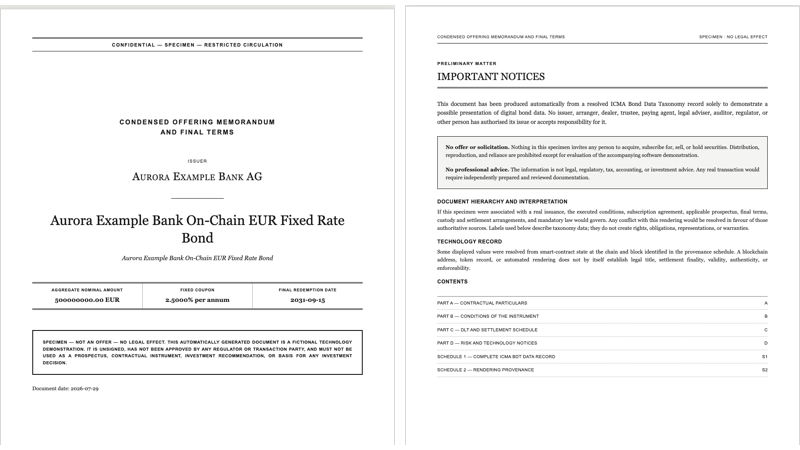
The browser displays a condensed, lawyer-style HTML document with:
- a formal cover and important notices;
- contractual particulars and instrument conditions;
- DLT, settlement, and risk schedules;
- every ICMA leaf field, including fields that are not populated; and
- chain, block, and source-contract provenance.
5. Term Sheet via Direct web3:// URL
The fifth URL also uses /xml/transform, but its xslt parameter is the
term-sheet resource's canonical web3:// URL. The renderer loads the
stylesheet from the finalized on-chain TextResource and displays a concise
indicative HTML term sheet.
6. Term Sheet via XPath URL Indirection
The sixth URL uses an xpath-uri: stylesheet specification. The renderer
first selects the href attribute of
<ProductDocumentationTermSheetTemplate>, obtains the web3:// URL from that
attribute, and then loads the stylesheet.
The fifth and sixth URLs should display identical term sheets. They demonstrate the two supported ways to address the same external XSLT: supplying its URL directly or discovering that URL in the rendered XML.
What You Will See
The screenshots below come from one reference run and are standardized to 800 × 450 pixels. Click any image to open it at full size. Contract addresses and block numbers in your run will differ, but the state transitions and rendered values will be the same.
Some screenshots combine two focused browser areas. In those images, the upper panel shows the first item named in the caption and the lower panel shows the second. The direct and XPath-discovered term-sheet URLs render the same HTML, so one term-sheet screenshot represents both links.
XML Template Resolution Stages
The two template views are identical across Parts 0–3 because the resource
addresses and finalized resource contents are immutable, while the
evmstate bindings remain unevaluated. The screenshots therefore show one
shared block-pinned pair.
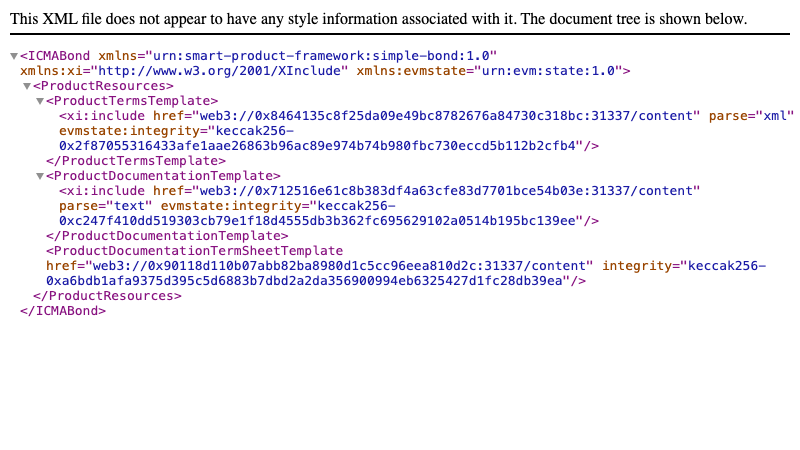
resolve=none, both xi:include elements remain visible and the evmstate bindings have not been evaluated.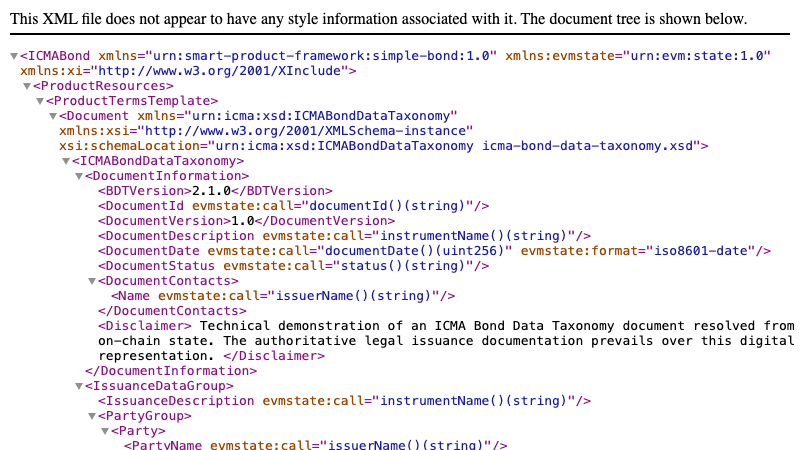
resolve=xinclude, the on-chain XML and text resources are embedded recursively, while their evmstate:call bindings remain visible and unevaluated.Part 0 — Initial Draft
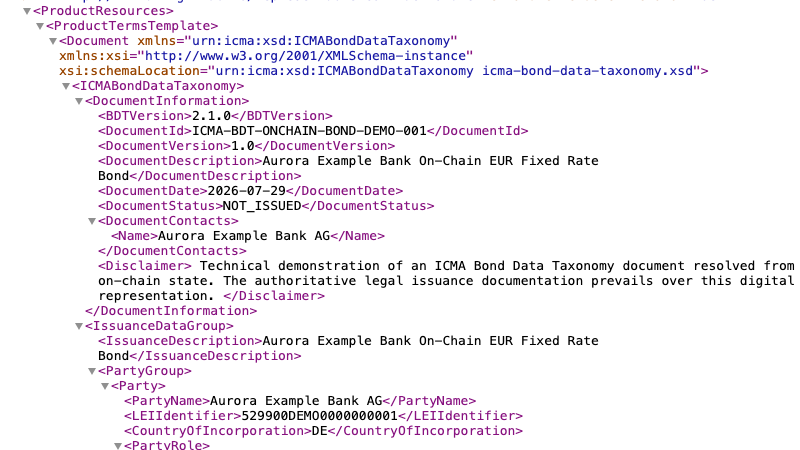
The bond has just been deployed. Its status is NOT_ISSUED; the interest rate,
derived first interest payment amount, identifiers, and security-token address
are not yet populated.
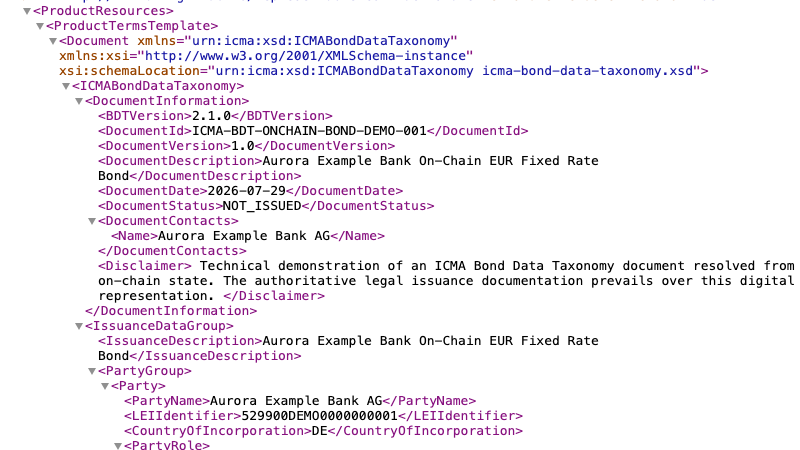
NOT_ISSUED in DocumentStatus. The same value also populates the issuance-lifecycle field.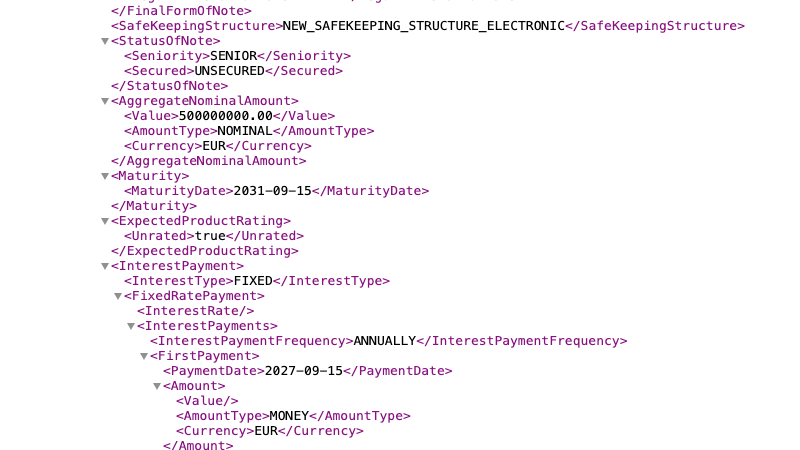
InterestRate and the derived first interest payment amount are empty before setInterestRate is called.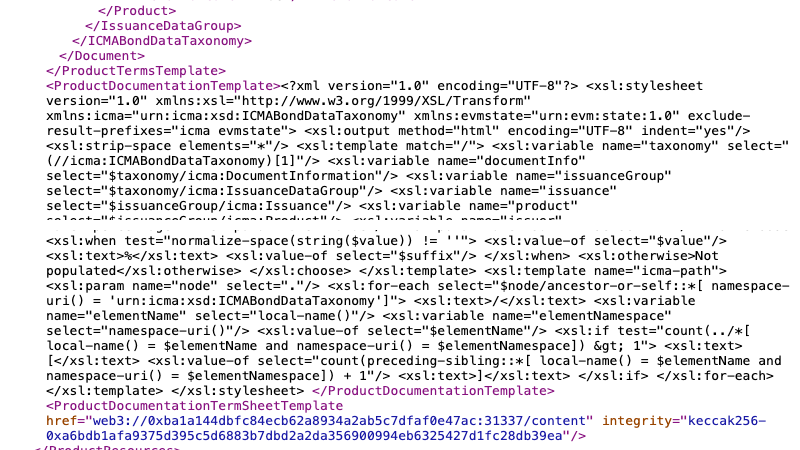
web3:// URL.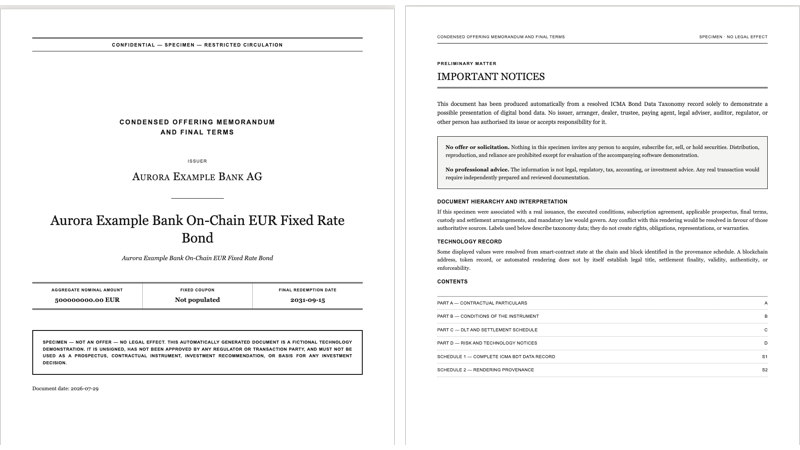
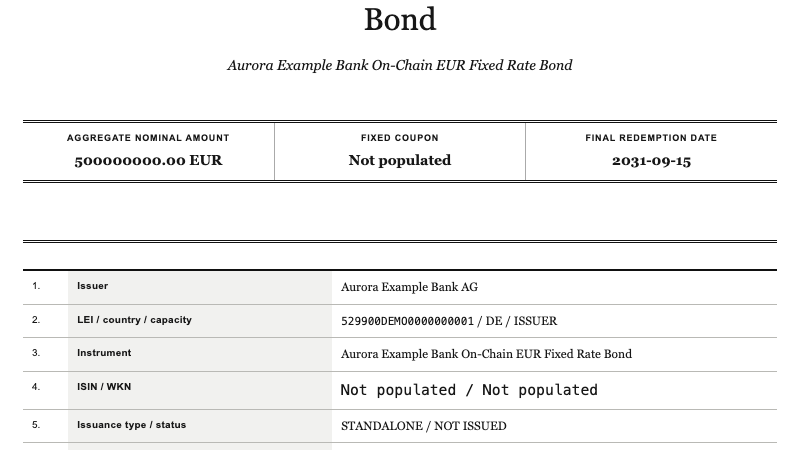
STANDALONE / NOT ISSUED.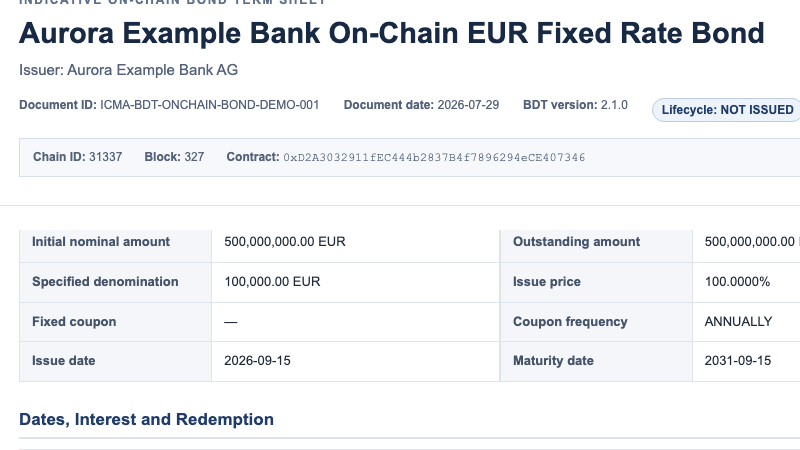
NOT ISSUED, while the fixed-coupon row uses an em dash for the unset rate.Part 1 — Interest Rate Assigned
The first transition sets the contract's fixed rate to 2.5000%. The derived
first interest payment amount becomes EUR 12,500,000.00, while the status
remains NOT_ISSUED.
DocumentStatus remains NOT_ISSUED.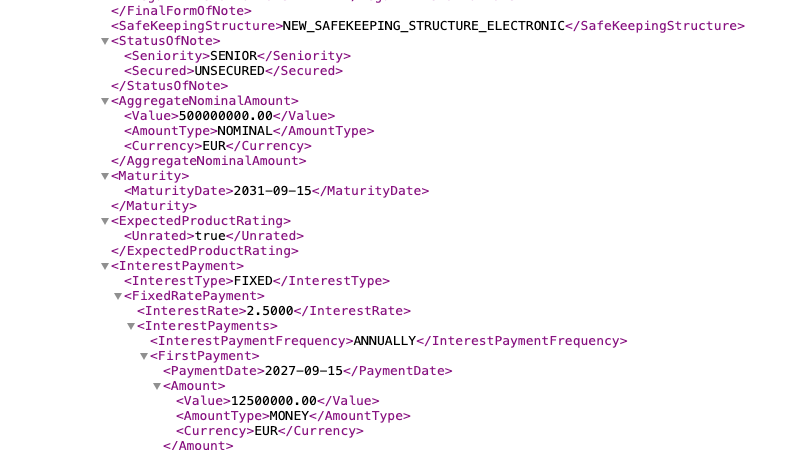
InterestRate to 2.5000 and the first interest payment amount to 12500000.00.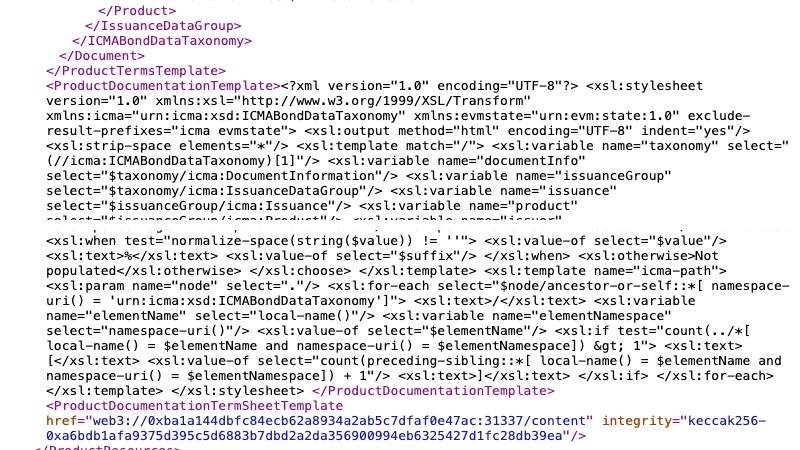
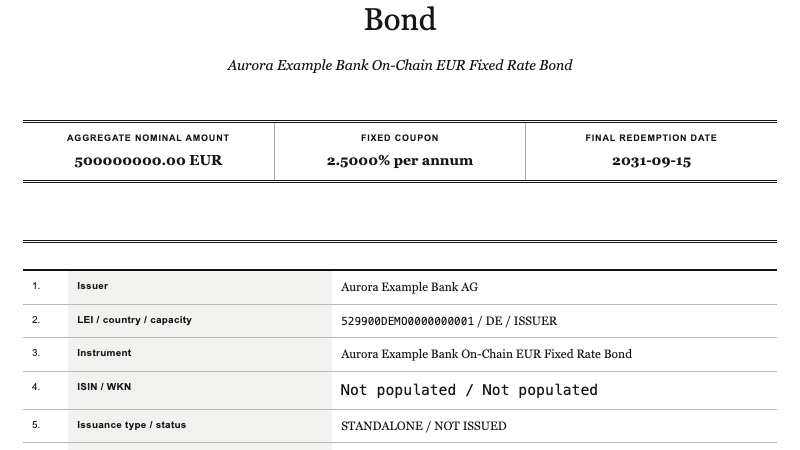
2.5000% per annum; the particulars still state STANDALONE / NOT ISSUED.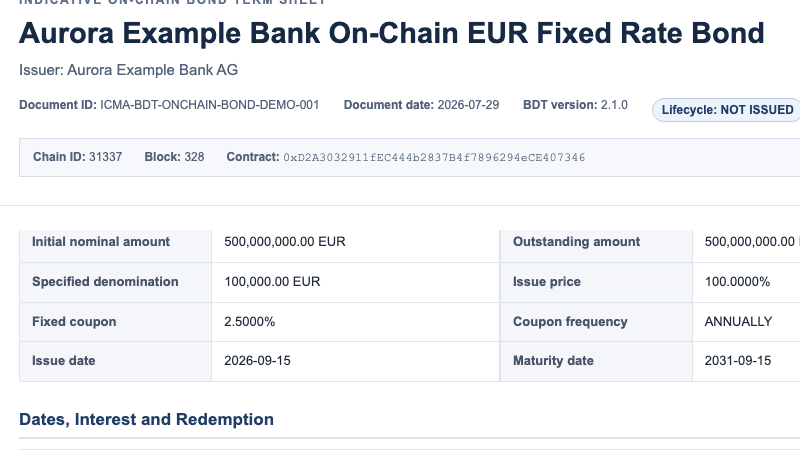
NOT ISSUED, while the principal-terms table now displays a 2.5000% fixed coupon.Part 2 — ISIN and WKN Assigned
The second transition adds ISIN DE000A4DEMO1 and WKN A4DEMO. The coupon
remains 2.5000%, and assigning identifiers alone does not change the
NOT_ISSUED status.
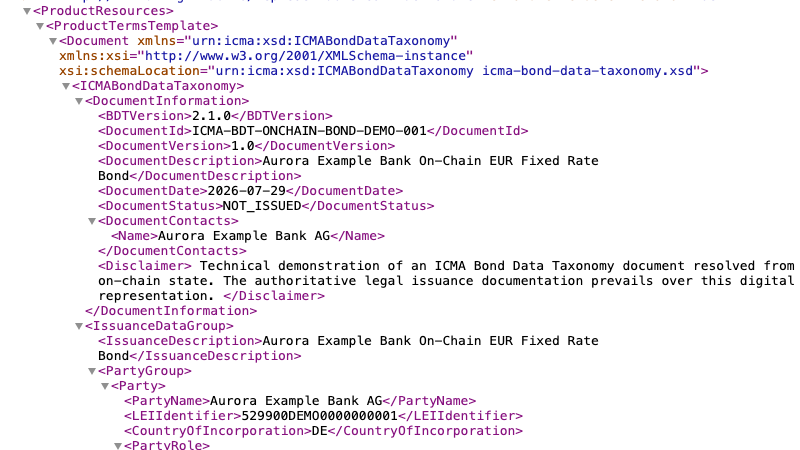
DocumentStatus remains NOT_ISSUED.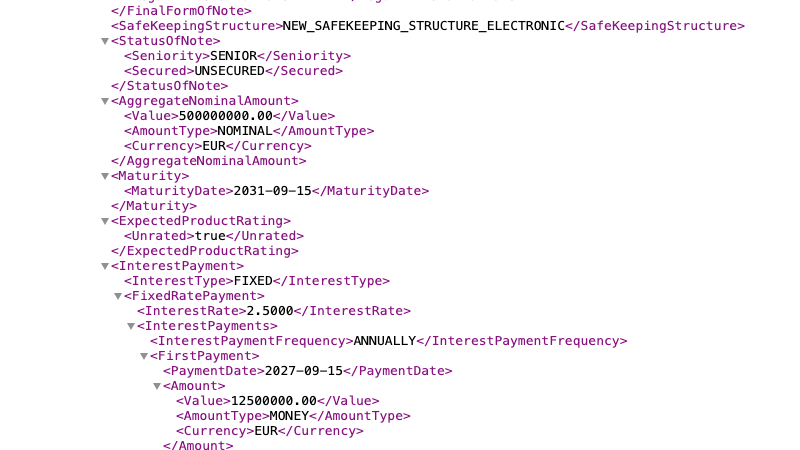
2.5000, and the derived first interest payment amount remains 12500000.00; the identifier transaction does not alter either value.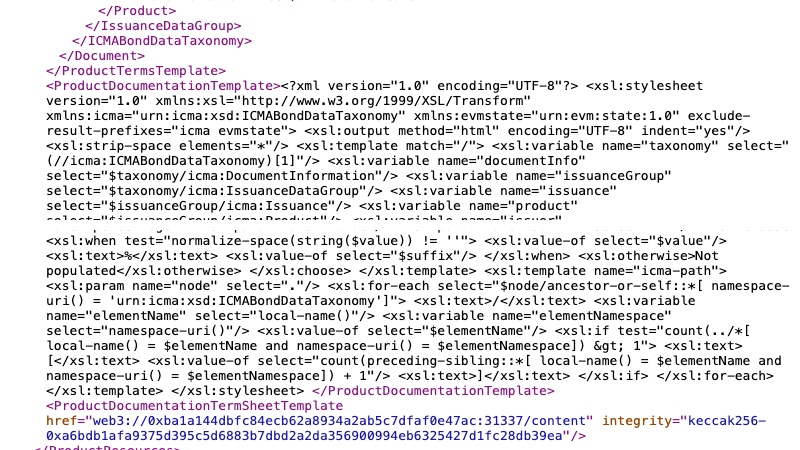
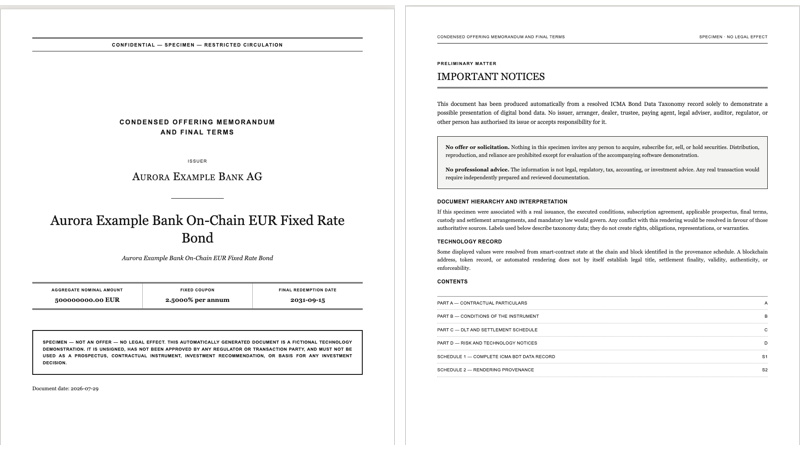
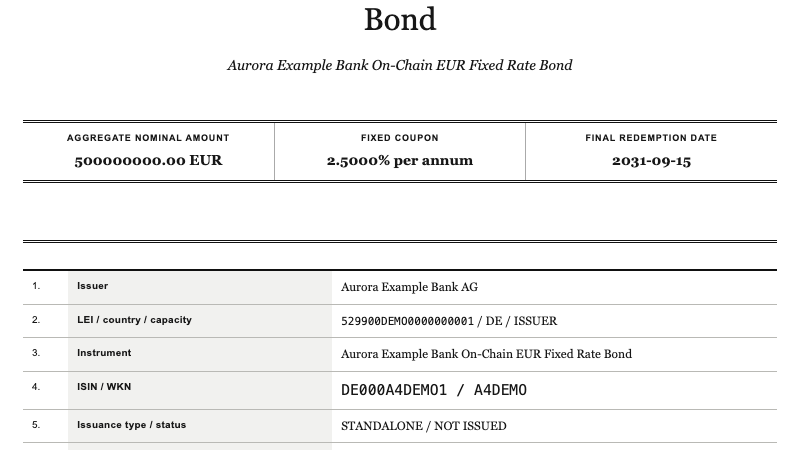
2.5000% per annum; the particulars show the identifiers but still report NOT ISSUED.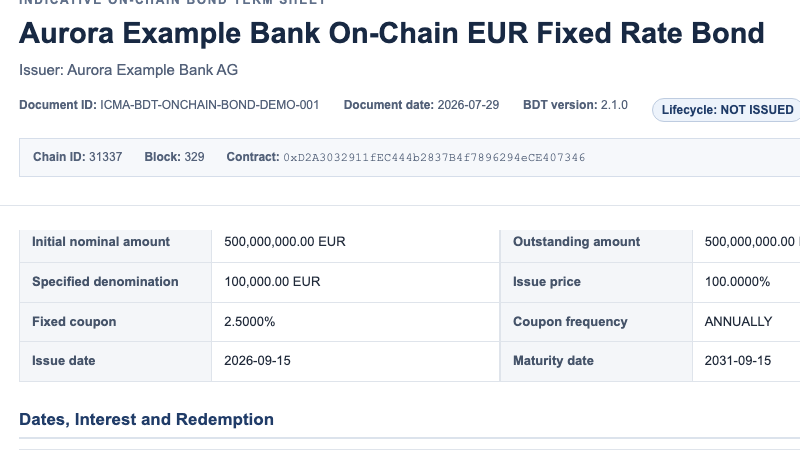
NOT ISSUED with a 2.5000% coupon; the full term sheet also shows the assigned ISIN and WKN.Part 3 — Security-Token Address Assigned
The final transition assigns the security-token address. That transaction
changes the contract status to ISSUED; the rate, derived first interest
payment amount, ISIN, and WKN remain populated.
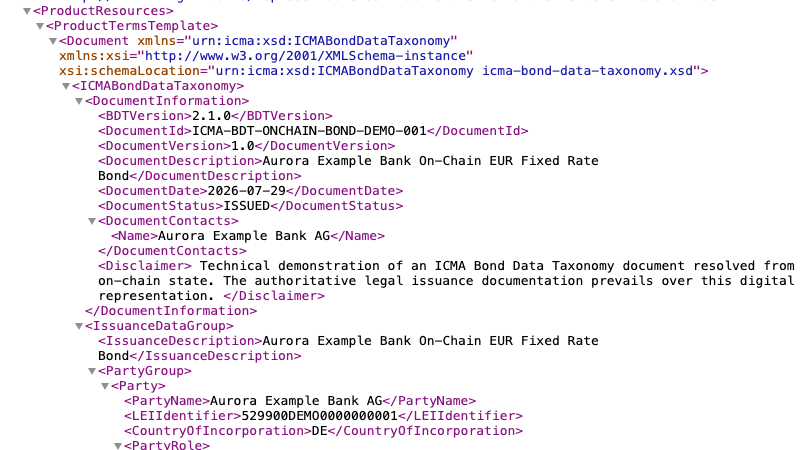
DocumentStatus now resolves to ISSUED, matching the issuance-lifecycle value derived from the contract.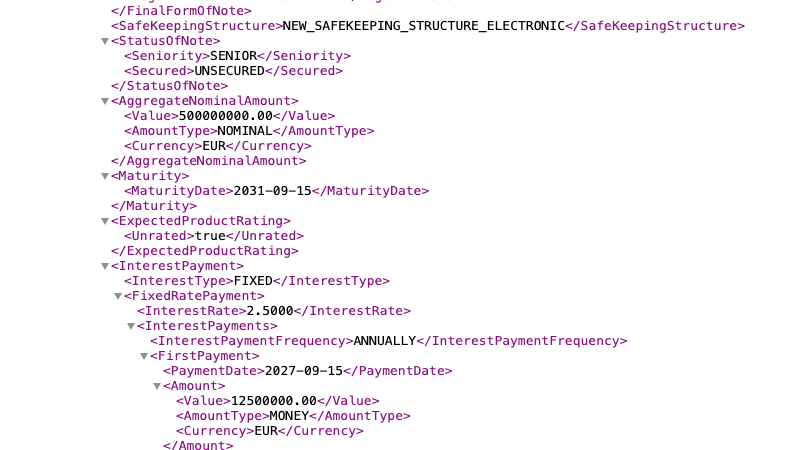
2.5000 and the first interest payment amount remains 12500000.00.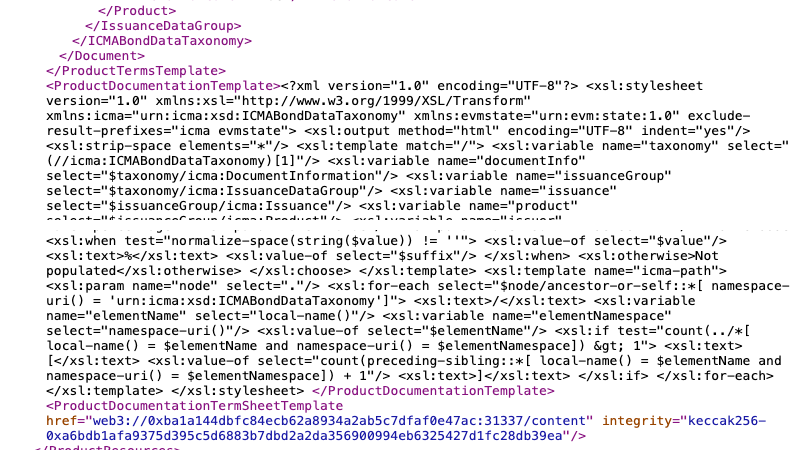
ISSUED snapshot.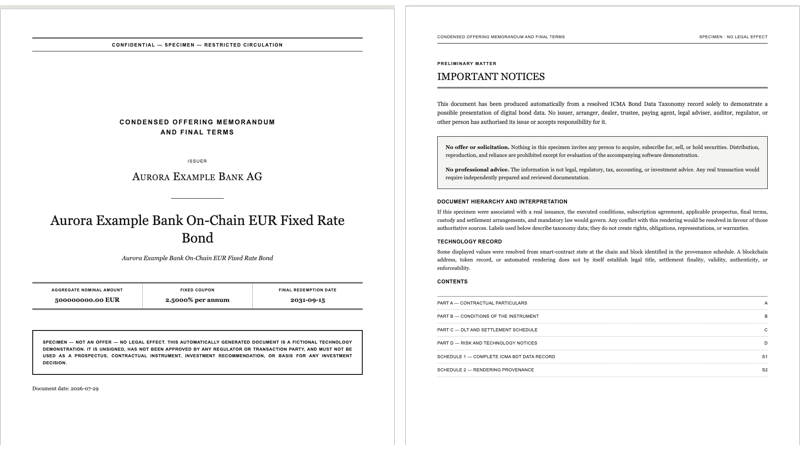
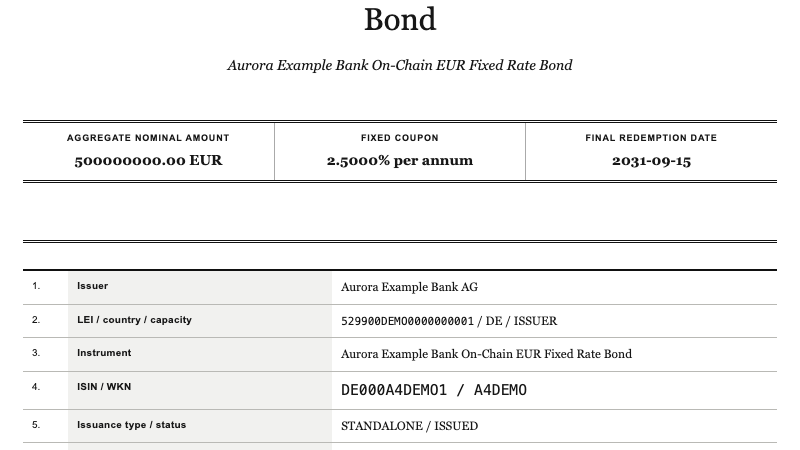
2.5000% per annum; the particulars now state STANDALONE / ISSUED.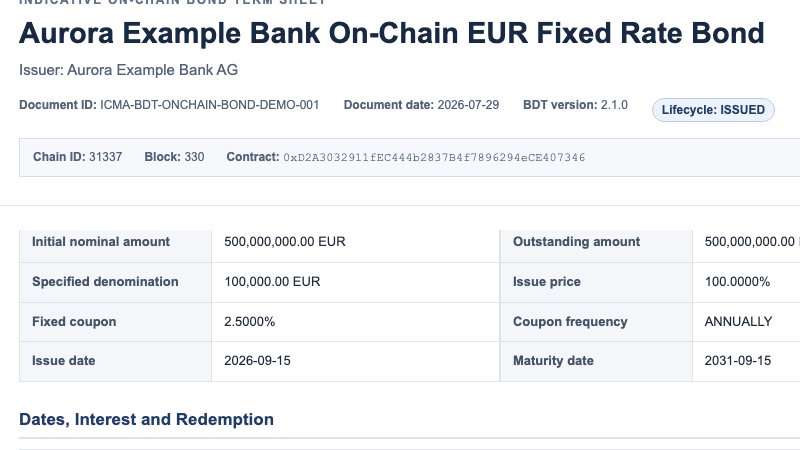
ISSUED, while the fixed-coupon row remains 2.5000%.Observe the Historical Views
Every printed URL contains the block number of its checkpoint. After the demo
has completed, reopen the Part 0, Part 1, and Part 2 URLs. They continue to show
the earlier states even though the latest contract state contains the assigned
interest rate, both identifiers, the security-token address, and the ISSUED
status.
This demonstrates that the XML, the XSLT resource resolution, and the post-processed HTML are all evaluated against the same block-pinned snapshot.
Stop the demo services with Ctrl+C in the renderer and Anvil terminals.