
Smart Product Framework: End-to-End Workflow
DemoEndToEndWorkflow runs the complete Simple Bond workflow on a local
development chain. It deploys the framework, publishes the product resources
and definition, creates a trade, and renders the registry, curve indication,
and product at their state-change checkpoints.
Sequence Overview
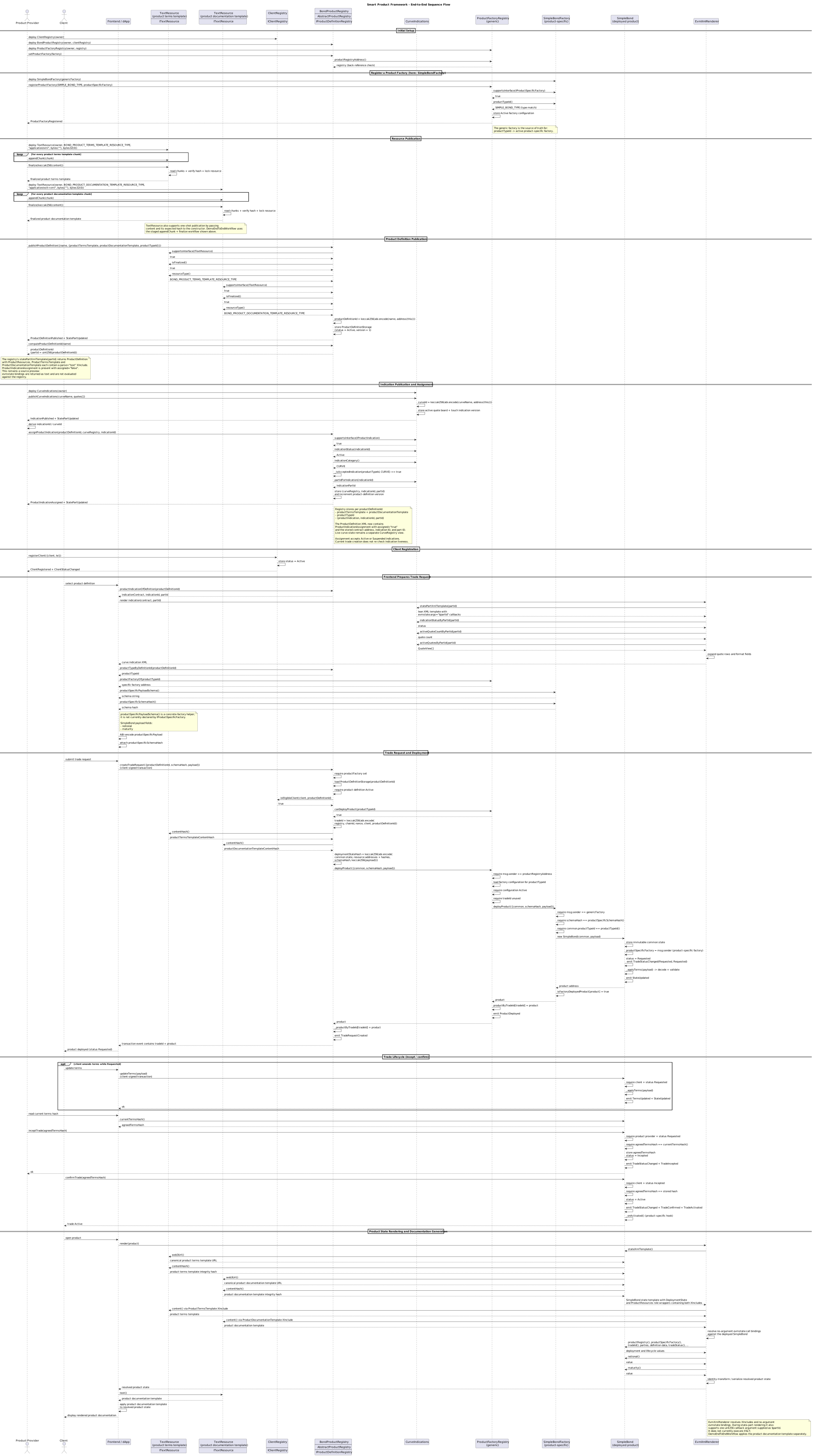
Before Running
Both run alternatives require:
- Java 21,
solc, and Node.js/npm; - Foundry (for Anvil);
- a Cancun-capable JSON-RPC node at
http://127.0.0.1:8545; and - the renderer web application at
http://localhost:8080when opening the printed XML URLs.
The checkout-based alternative additionally requires Maven and a project
checkout. The checkout-free alternative requires
JBang, curl, tar, and a Bash-compatible shell
such as macOS/Linux Bash or Windows Git Bash. JBang is also required if you
start the renderer from the command line instead of the IDE.
Start the Local Chain
Start Anvil with the chain ID used by the renderer and the Cancun hard fork:
anvil --chain-id 1337 --hardfork cancun
The pre-funded Anvil accounts are public development accounts and must never be used on a chain carrying real assets.
Start the Renderer
Start the renderer in a second terminal and leave it running:
jbang --java 21 -Dethereum.rpcUrl=http://127.0.0.1:8545 -Dethereum.chainId=1337 net.finmath:representable-contract-state-web:2.5.1
Alternatively, run EvmXmlRendererApplication from the IDE.
Run the Demo
Alternative 1: Run From a Project Checkout
Install the Solidity dependencies into the Solidity source directory from the repository root:
npm ci --prefix representable-contract-state-web/src/main/solidity
Run
DemoEndToEndWorkflow
from your IDE, with representable-contract-state-web as its working
directory. The Solidity source and compiler-output paths are relative to that
module.
Alternative 2: Checkout-Free JBang Run
The following commands download the version-matched Solidity source archive, install its locked npm dependencies in a temporary directory, and use JBang to run the demo from the released Java artifact. No Git checkout or Maven build is required. Run them in a third terminal:
DEMO_VERSION=2.5.1
DEMO_TAG="representable-contract-state-parent-${DEMO_VERSION}"
DEMO_WORK_DIR="$(mktemp -d)"

curl -fsSL \
  "https://gitlab.com/finmath/representable-contract-state/-/archive/${DEMO_TAG}/representable-contract-state-${DEMO_TAG}.tar.gz" \
  | tar -xz -C "$DEMO_WORK_DIR" --strip-components=1

DEMO_SOLIDITY_DIR="$DEMO_WORK_DIR/representable-contract-state-web/src/main/solidity"

if [ -f "$DEMO_SOLIDITY_DIR/package-lock.json" ]; then
  npm ci --prefix "$DEMO_SOLIDITY_DIR"
else
  npm ci --prefix "$DEMO_WORK_DIR"
  ln -s "$DEMO_WORK_DIR/node_modules" "$DEMO_SOLIDITY_DIR/node_modules"
fi

cd "$DEMO_SOLIDITY_DIR"

jbang --java 21 \
  -Dloader.main=net.finmath.smartcontracts.representablestate.demo.SmartProductFramework.DemoSimpleBond \
  --main=org.springframework.boot.loader.launch.PropertiesLauncher \
  "net.finmath:representable-contract-state-web:${DEMO_VERSION}"
The release archive is necessary because the demo compiles its Solidity
contracts at runtime. Pinning the archive and Java artifact to the same version
keeps the contract sources and demo code consistent. The compatibility branch
handles release 2.5.1, which stores its npm manifest at the archive root;
releases containing the relocated manifest install their dependencies directly
in the Solidity source directory.
Workflow
The demo performs these steps:
- Funds the client development account.
- Deploys the client registry, product registry, generic factory, and Simple Bond factory, then wires their references.
- Publishes and finalizes the XML product terms template and XSLT product
documentation template as on-chain
TextResourcecontracts. - Publishes the Simple Bond product definition and captures registry view
R0. - Publishes the curve indication and captures curve view
C0. - Assigns the curve to the product definition and captures registry view
R1. - Updates the EUR-2Y yield from 2.75 to 2.85 and captures curve view
C1. - Registers the client and verifies eligibility.
- Discovers the product type, factory, payload schema, and schema hash.
- Creates and amends the trade request, then incepts and confirms it.
- Verifies product provenance and captures product views
P0throughP3. - Prints every renderer URL, grouped by contract.
Historical Contract Views
Every checkpoint uses the block from the transaction receipt that caused its state change. The labels below are relative to one demo run; actual block numbers can have gaps and are printed by the demo.
Full-state and state-part views use different endpoints:
http://localhost:8080/xml?contract=<product-address>&block=<receipt-block>
http://localhost:8080/xml/part?contract=<address>&partid=<part-id>&block=<receipt-block>
The product documentation is an optional derived view. It is available through
the separate XSLT post-processing endpoint while the canonical /xml response
remains unchanged:
http://localhost:8080/xml/transform?contract=<product-address>&block=<receipt-block>&xslt=<url-or-xpath>
Product-Definition Registry
| Checkpoint | Block label | Status | Version | Visible change |
|---|---|---|---|---|
| Definition published | R0 |
1 — Active |
1 | Resources appear; ProductIndicationAssignment has assigned="false" |
| Curve assigned | R1 |
1 — Active |
2 | Assignment changes to assigned="true" and exposes its contract, indication ID, and part ID |
The <ProductDefinition> view groups both inert source previews under
<ProductResources>. Its <ProductTermsTemplate> and
<ProductDocumentationTemplate> children identify the role of each included
resource explicitly.
<ProductIndicationAssignment> represents the registry's own reference state.
It is explicitly unassigned at R0; at R1 it contains contractAddress,
indicationId, and partId. The live indication state remains a separate
partial view on the indication contract and is rendered at the same block when
needed.
Curve Indication
| Checkpoint | Block label | Status | Active quotes | EUR-2Y yield | EUR-5Y yield |
|---|---|---|---|---|---|
| Initial publication | C0 |
1 — Active |
2 | 2.75 | 3.10 |
| EUR-2Y update | C1 |
1 — Active |
2 | 2.85 | 3.10 |
All other rendered EUR-2Y fields remain unchanged. Rendering C0 after the
update has been mined demonstrates that the renderer is reading historical
state rather than the latest quote.
Product Lifecycle
| Checkpoint | Block label | Trade status | Notional | Maturity | Change |
|---|---|---|---|---|---|
| Initial request | P0 |
0 — Requested |
1000000.00 |
Initial date (now + 3 years) |
Product deployed |
| Amended request | P1 |
0 — Requested |
1250000.00 |
Amended date (now + 4 years) |
Economic terms changed |
| Inception | P2 |
1 — Incepted |
1250000.00 |
Amended date | Status changed |
| Confirmation | P3 |
2 — Active |
1250000.00 |
Amended date | Status changed |
Most product XML fields remain unchanged because the product identity and
deployment data are immutable. Inception also stores agreedTermsHash, but
that value is currently not part of the product XML. Compare TradeStatus,
Amount, and UnadjustedDate when inspecting the product snapshots.
Every snapshot retains the <SimpleBond> root with sibling <DeploymentState>
and <ProductResources> sections. The latter contains the named product terms
and product documentation template slots.
At the end of the demo, the console prints the renderer URL for every
checkpoint, already populated with the corresponding contract address, state
part ID where required, and receipt block. Open these URLs to compare the
historical snapshots directly. The demo also checks the expected block
metadata and state values programmatically. The
TextResource, client registry, and factory contracts do not currently expose
renderer-compatible XML state; the finalized text resources remain available
through their immutable web3Url() values.